If you run Facebook ads or Instagram ads and want to spy on competitors, you need the right tool. We spent weeks testing Tyver at AdSpy.Social and I can tell you it is one of the most powerful Meta ad spy tools available in 2026.
I have tested dozens of ad spy tools over the years. Some were bloated with useless features. Some had stale databases full of dead ads. And some charged way too much for basic filters. When Tyver landed on my radar, I was sceptical.
Another Facebook ads spy tool making big claims? But after running it through real campaigns across multiple verticals, I changed my mind. Fast.
In our Tyver review, we’ll explain every feature, pricing plan, and real-world use to help you decide if it fits your workflow as an affiliate marketer or performance marketer.
Let me walk you through everything I found.
What is Tyver?
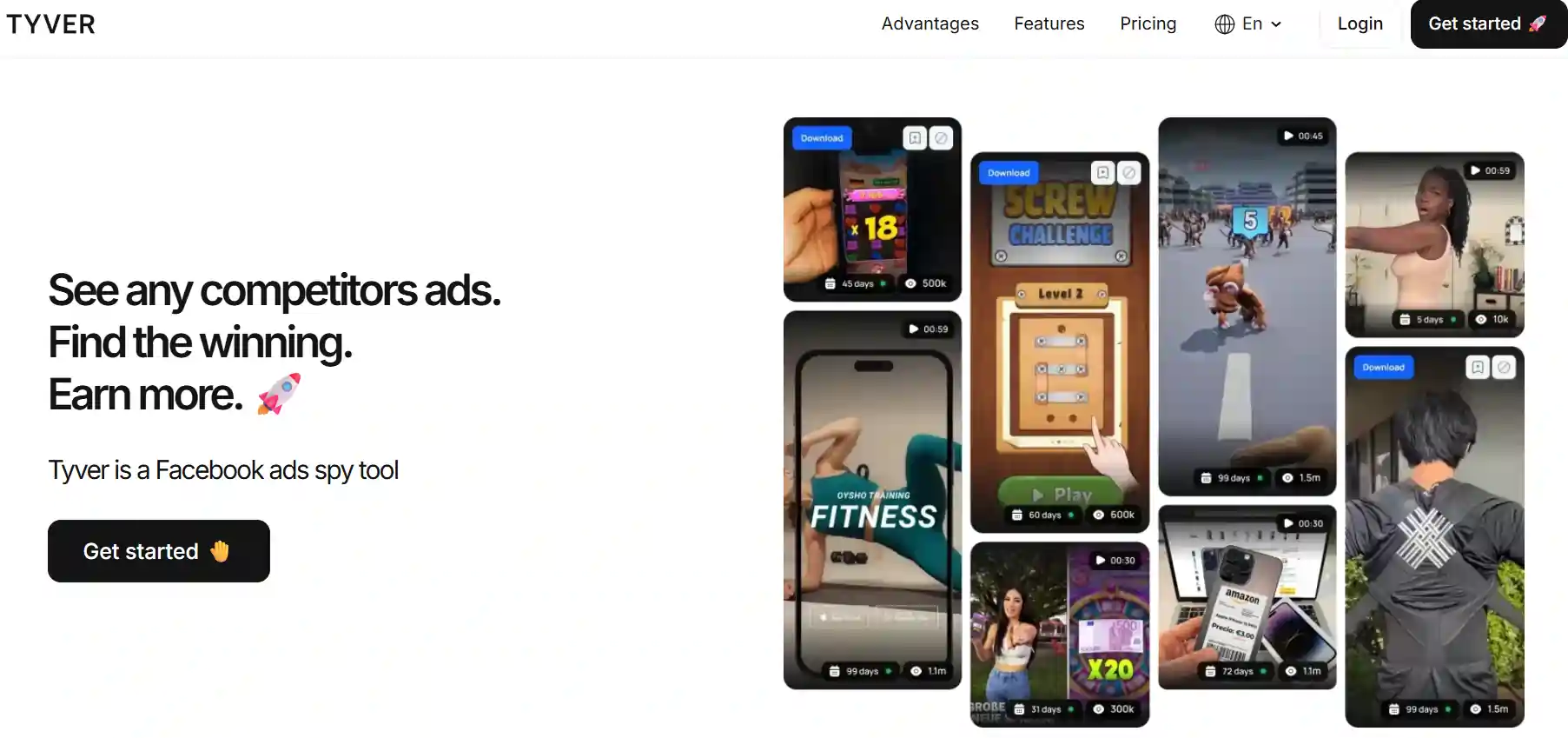
Tyver is a Facebook ad spy tool built specifically for Meta advertising. It collects and tracks ads running across Facebook, Instagram, Threads, Audience Network, and Messenger. Every day, Tyver adds more than 2 million fresh creatives from over 100 countries to its database.
Unlike the Facebook Ads Library, which only shows you that an ad exists, Tyver goes much further. It shows you how long an ad has been running, how much reach it has, who sees it, and what other ads connect to the same advertiser. For anyone doing competitor research on Meta, that level of detail makes a huge difference.
I found Tyver especially useful for affiliate marketers, media buyers, dropshippers, and ad agencies. Anyone running paid traffic on Meta who wants to make smarter creative decisions based on real data will find value here.
At its core, Tyver is a creative research platform. It helps you find winning ad creatives, analyse campaign structures, and prepare your own launches with confidence.
Tyver Ad Spy Tool Reveals Winning Meta Ads
exclusive
Use Tyver to spy winning Facebook and Instagram ads. Apply code ADSPYSOCIAL for 20% off instantly.
SAVE UP TO 20%
Tyver Database Size and Coverage
One thing that blew me away was the sheer size of Tyver's ad database. It claims to cover 91% or more of all Facebook ads. That is a bold claim, and after weeks of testing, I believe it.
Every single day, Tyver pulls in 2 million new ad creatives from over 100 countries. And the database updates daily. So you are never looking at stale or outdated ads.
In verticals like gambling, nutra, and e-commerce, ad creatives have short lifespans. Having access to fresh data every day is a game-changer.
Here is a quick look at how Tyver's ad database stacks up.
| Feature | Details |
|---|---|
| Total ad coverage | 91%+ of all Facebook ads |
| Daily new creatives | 1 to 2 million |
| Countries covered | 100+ |
| Meta platforms tracked | Facebook, Instagram, Threads, Audience Network, Messenger |
| Verticals supported | Gambling, Nutra, E-commerce, Sweepstakes, Apps, Dropshipping |
During my testing, I searched for ads in gambling and got over 3.8 million results just from one vertical filter. A search for “weight loss” in nutra returned over 660,000 creatives.
And a specific search for “Casino Bonus” in gambling pulled up more than 48,000 ads. Numbers like those tell me Tyver is collecting data at a serious scale.
Advanced Filters That Actually Work
Most ad spy tools offer basic search. You type a keyword, pick a country, and get results. Tyver takes filtering to another level with 20+ advanced filters. And these are not just decorative. They actually help you find exactly what you need fast.
I tested every single filter during my review. Here is what stood out.
Keyword and phrase search lets you run broad or exact match queries. Broad search shows ads containing your keywords in any order. Exact search only returns ads with your precise phrase. Simple but effective.
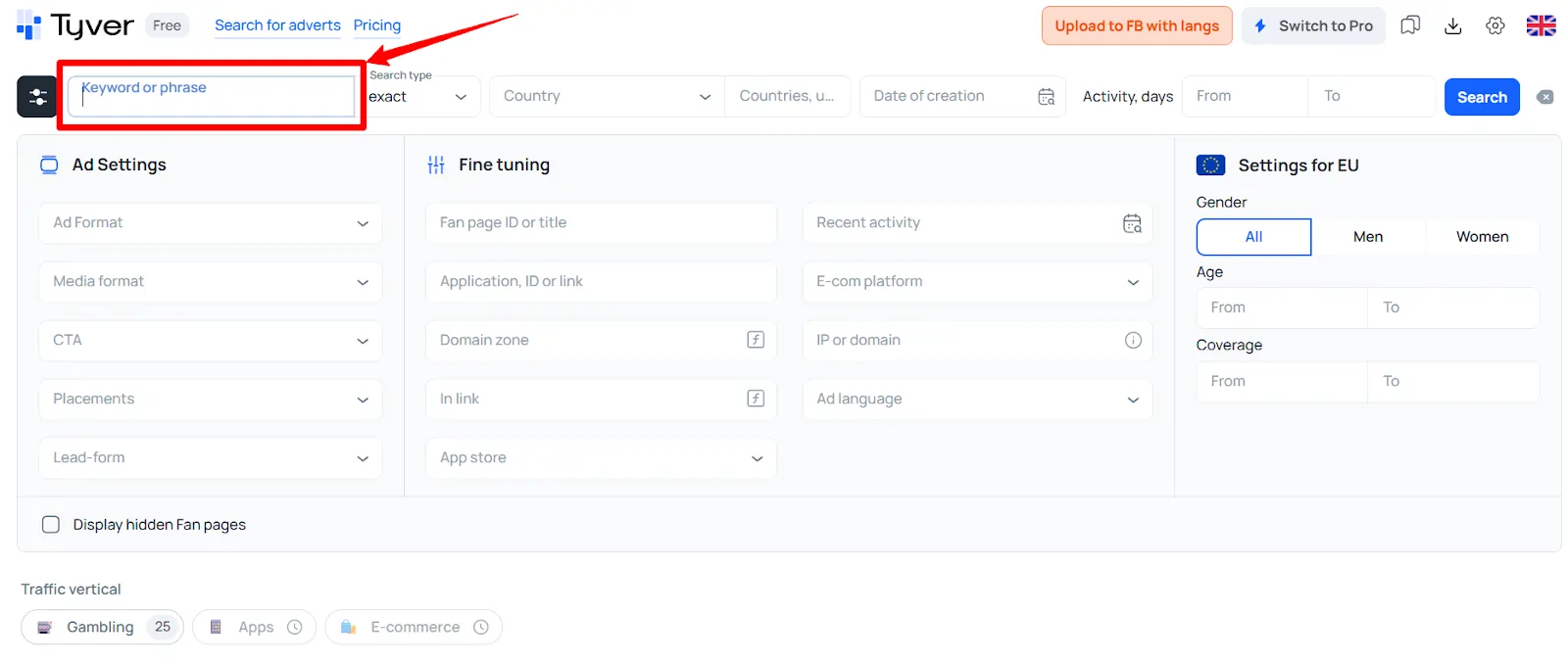
Geo filtering covers 100+ countries with options to filter by continent. Not every country is available yet, but Tyver mentioned they add new ones based on user demand.
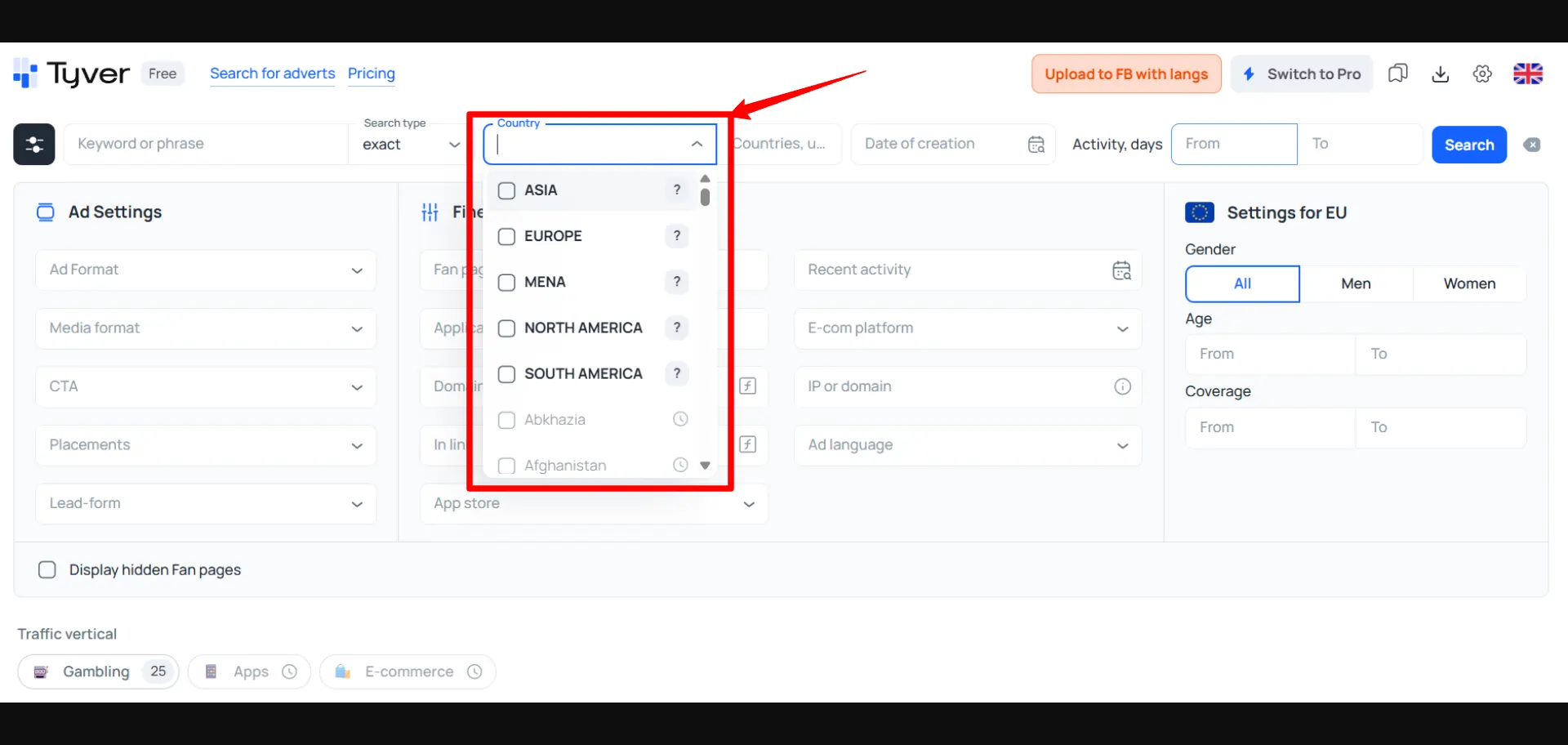
Date and activity filters allow you to search by ad creation date and the number of days an ad has been active. Want to find ads running for more than 14 days? Set a range and sort. Ads running longer usually mean profitable campaigns.
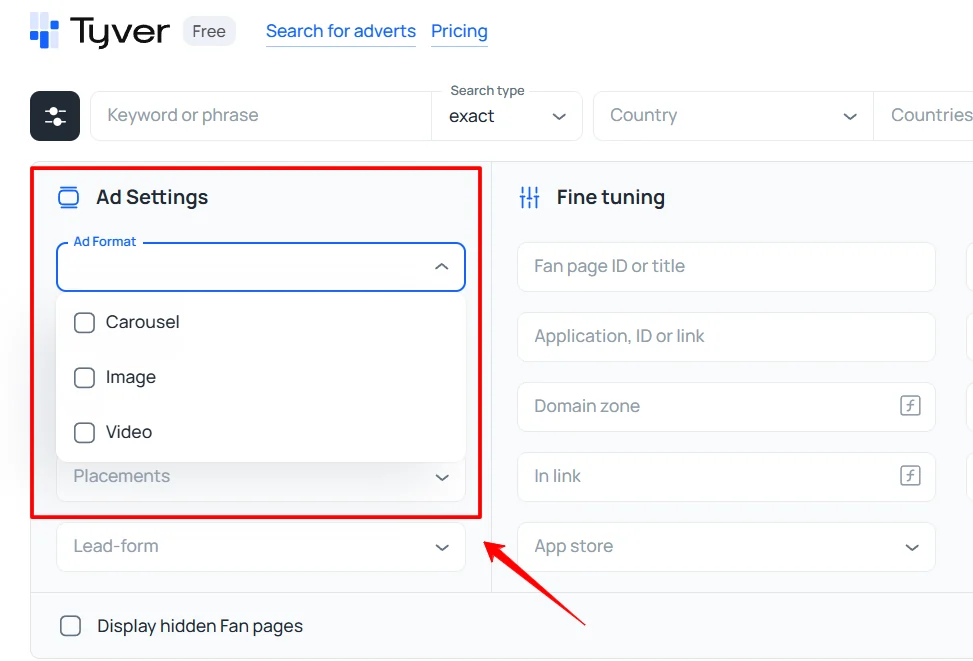
Ad format filters let you narrow by carousel, image, or video. You can also filter by media aspect ratio like 1:1 or 9:16. For performance marketers creating vertical video content, that filter is gold.
CTA button filter narrows results by call-to-action. Options include Add to Cart, Buy Now, Learn More, Download, Install App, and more. When I searched gambling ads filtered by “Download” and “Install Now” CTAs, I found aggressive campaigns in seconds.
Placement filters let you choose between Facebook, Instagram, Audience Network, Messenger, Threads, and even WhatsApp and Oculus. If you only care about Instagram ad creatives, one click isolates them.
The E-commerce platform filter is perfect for dropshipping and Shopify store research. You can filter ads by CMS or platform, including Shopify, WooCommerce, WordPress, and Wix. I used it to find Shopify store ads in seconds.
But here is what truly sets Tyver apart from competitors. 👇
In-Link Filter for Deep Campaign Analysis
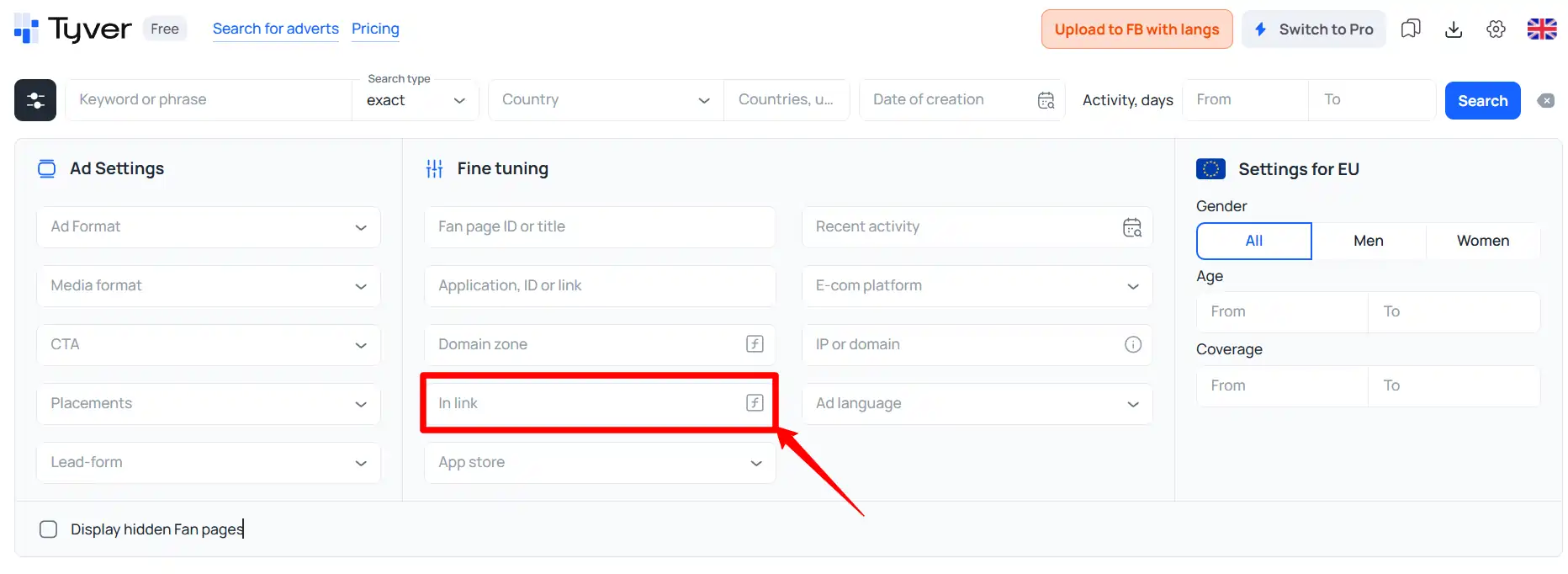
Most affiliate marketers and media buyers will love Tyver's “In Link” filter. I have not seen anything like it in other ad spy platforms at a comparable price point.
You can enter any text that appears in an ad's destination URL. That means you can search by UTM tags, pixel IDs, or ad IDs.
Why does that matter? Because a single pixel ID or UTM parameter usually ties back to one advertiser or campaign. When you search by pixel ID, Tyver shows you every ad connected to that campaign.
Suddenly, you are not just looking at one creative. You see an entire advertising strategy laid out. You can track how many variations an advertiser tested. You can see which formats they scaled. You can understand testing logic and spot winning approaches.
At AdSpy.Social, we consider link-based filtering a premium feature. And Tyver offers it on a $79 per month plan. That is seriously good value for performance marketers running Meta traffic at scale.
EU Demographic Filters and Reach Data
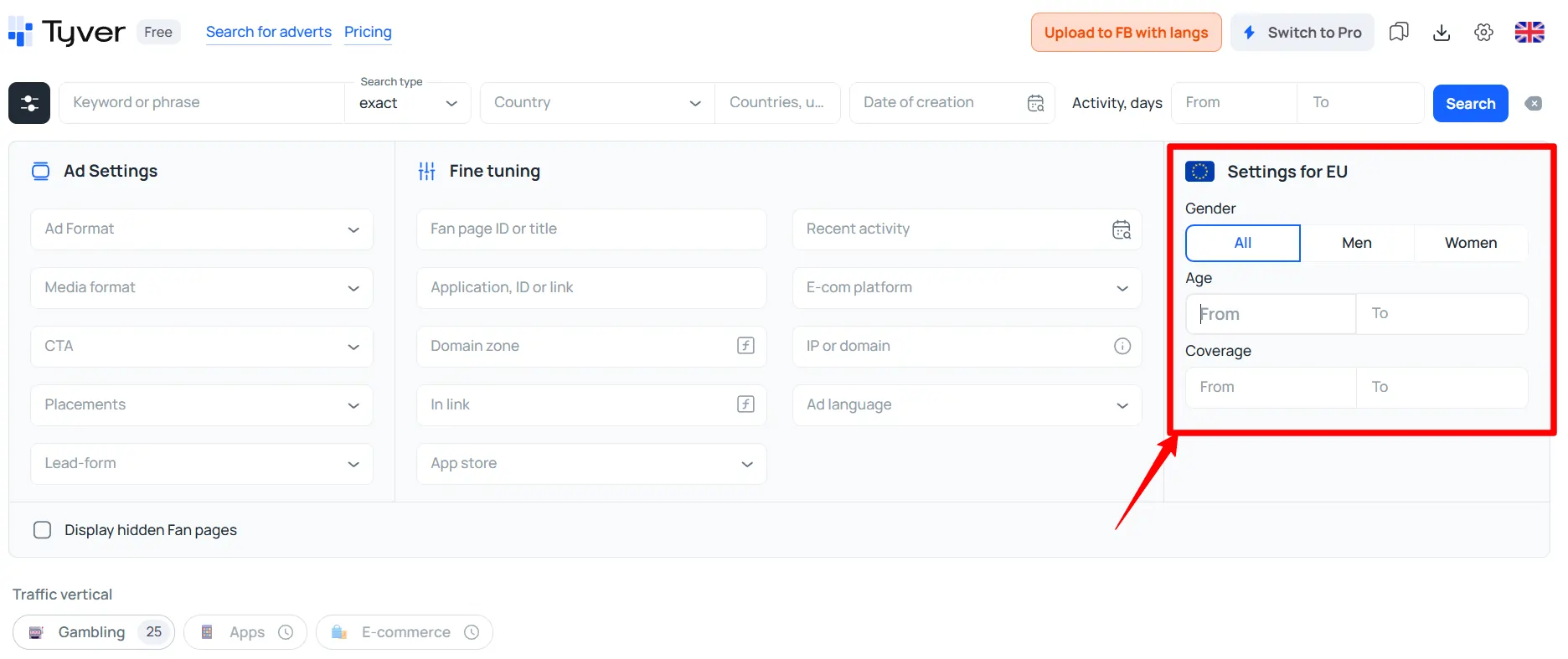
For anyone running Facebook ads in Europe, Tyver has an extra set of filters that most competitors lack. EU-specific filters include gender targeting, age range, and ad reach or impressions data.
During my testing, I filtered gambling ads in Romania and immediately saw reach data, gender breakdowns, and age demographics attached to each creative. For media buyers running in EU geos, that level of audience targeting analysis is extremely helpful.
A quick note though. Reach and demographic data is currently only available for EU countries. Tyver mentioned plans to expand coverage, but for now, it is limited to Europe. If you run in non-EU geos, you will still get full access to creatives and campaign data, just without impression stats.
| EU Filter | What It Does |
|---|---|
| Gender | Filter by Men, Women, or All |
| Age Range | Set minimum and maximum age |
| Coverage (Reach) | Set impression range for ads |
I set a reach filter of 1,000 to 5,000 impressions to find mid-range performing ads. It helped me spot creatives that passed initial testing but had not saturated yet. Perfect for finding fresh angles.
Ad Details and Creative Analysis
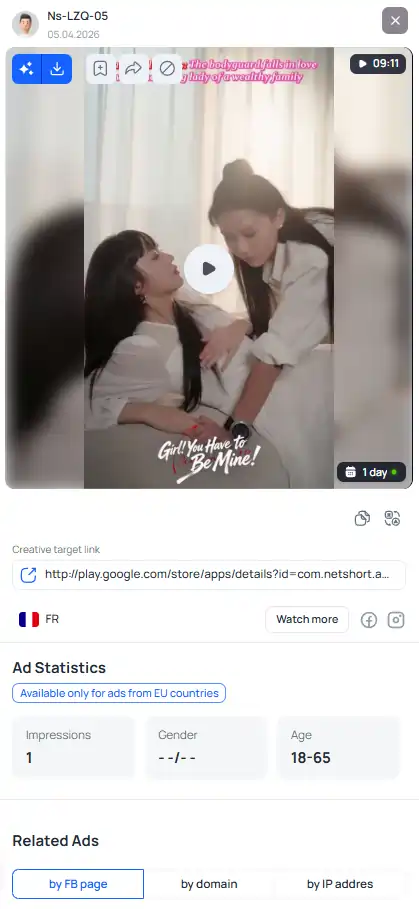
Clicking on any ad in Tyver opens a side panel with full creative details. Here is what you see for every single ad.
Ad copy and media shows you exactly what audiences see. Videos play in full screen vertical format, so you get a realistic preview. Images display at full resolution.
The target link shows where traffic goes. You see both a readable URL and a destination link. Handy for checking landing pages without leaving Tyver.
Activity dates tell you when an ad was first spotted and when it was last active. You also see how many days total it has been running. Longer activity usually signals a profitable ad.
Country flags show every geo where an ad runs. If an advertiser targets multiple countries, you see all flags at once.
CTA and placements confirm which button and which Meta platforms an ad runs on.
Related ads appear at the bottom of each creative's panel. Tyver groups related ads by Fan Page, domain, or IP address. One click shows you every other ad from that same advertiser. When I found a winning nutra creative, I clicked “similar by domain” and spotted 15 more ads from that same campaign. That kind of insight saves hours of manual research.
Built-In Translation and Media Processing 🌐
Running campaigns in foreign geos means dealing with ad copy in languages you might not speak. Tyver solved that with a one-click translation feature built directly into each ad card.
I tested it on German, Portuguese, and Russian ad copy. One click and I had a readable English translation right there in Tyver. No copying text. No switching to Google Translate. Just click and read. For anyone running multi-geo campaigns, that feature alone saves a lot of time.
Then there is Media Processing, which is a newer feature still partially under development.
Media Uniquification creates slightly altered versions of any ad creative. It applies small changes like rotation, cropping, and brightness adjustments to produce up to 10 unique copies at a time.
I tested it on a gambling video creative and had 10 variations ready within a minute. Each one was visually distinct enough for testing on separate ad sets.
AI Upscaling is an upcoming feature that will adjust image and video resolution using AI. At the time of writing, it was still in alpha testing. But based on what I saw from Media Uniquification, I am optimistic about quality.
Favourites and Folder Organisation
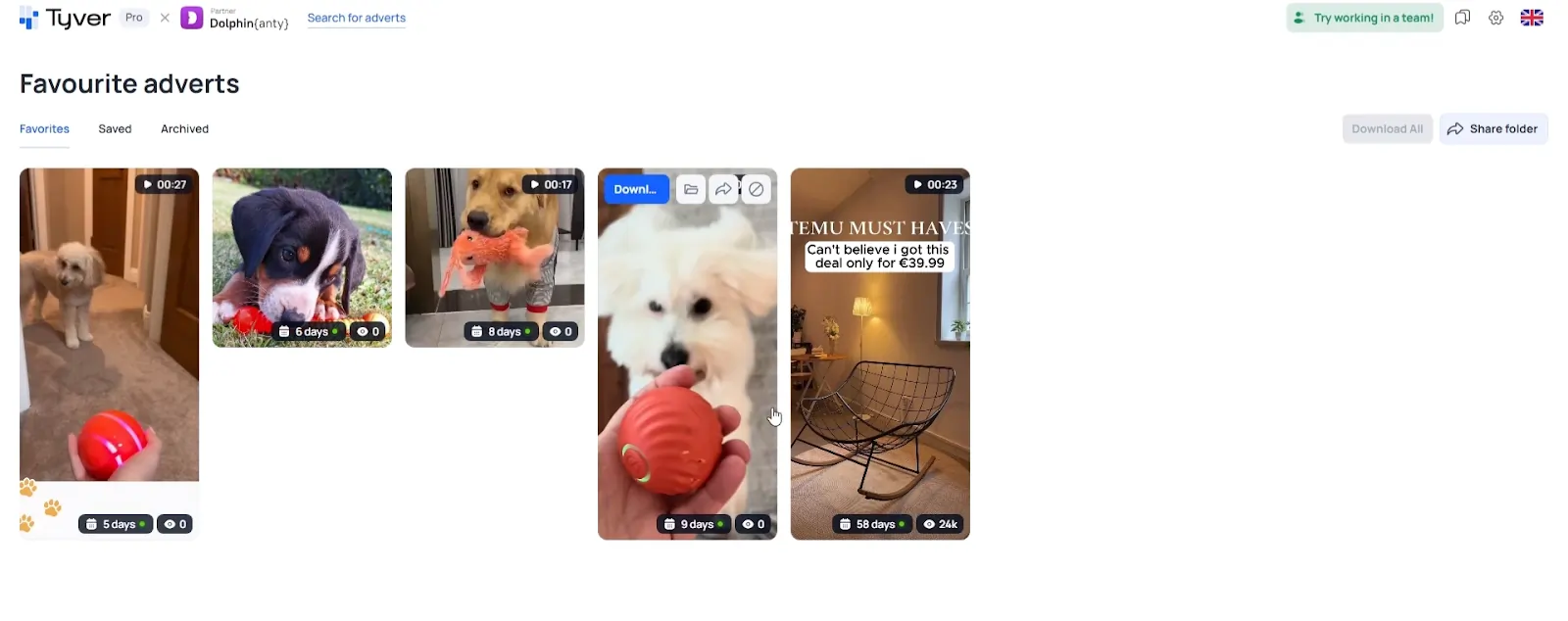
Over time, your ad research builds up. You spot winning creatives across verticals. You save references for future campaigns. Without proper organisation, that research gets lost.
Tyver handles well with a Favourites system and unlimited folders. You can create as many folders as you want and sort saved ads by offer, geo, vertical, ad angle, or any category that fits your workflow. I created separate folders for gambling EU, nutra weight loss, and Shopify dropshipping. Within a week, I had a personal library of proven ads to reference for future launches.
What I really appreciated was the team sharing feature. You can share any folder via a direct link. Recipients do not need a Tyver account to view saved creatives. That is perfect for sending references to designers, copywriters, or clients.
One small limitation I noticed is that related ads do not show for viewers who are not logged in. But for basic creative sharing, it works brilliantly.
Team Management for Agencies
If you run an ad agency or manage a media buying team, Tyver's Team plan has useful controls. You can add team members with separate accounts. Each member gets a login. No password sharing needed.
And here is what I liked most. You can set viewing limits per user with three options.
| Limit Type | How It Works |
|---|---|
| Strict | Hard cap on ad views per month |
| Soft | Limit with a warning but no hard stop |
| No Limit | Shared pool across all team members |
For agencies managing multiple media buyers, controlling how many ads each person views prevents unnecessary credit usage. When budgets are tight, that control matters.
Interface and User Experience
Tyver's interface is clean and minimal. Ads display exactly how they look on Facebook. Full-screen vertical videos render properly. Carousel ads show all slides. No distorted previews or broken layouts.
Filters sit at the top of your dashboard. One click on a filter icon hides or shows them. Below filters, you see ad results with sorting options by creation date, ad reach, or activity days. I mostly sorted by activity days to find long-running winners.
A sticky toolbar at the bottom right gives quick access to favourites, media downloads, and account settings. I appreciated that ad view credits show in settings so you can monitor usage throughout a billing cycle.
One small gripe. Ad details open in a side pane rather than a new tab or pop-up window. It felt slightly cramped on smaller screens. But on a full desktop monitor, it worked fine and kept everything in one view.
Tyver is available in English, Russian, and Ukrainian. For an international tool serving affiliates across multiple geos, that language support is a solid touch.
Tyver Pricing Plans At a Glance
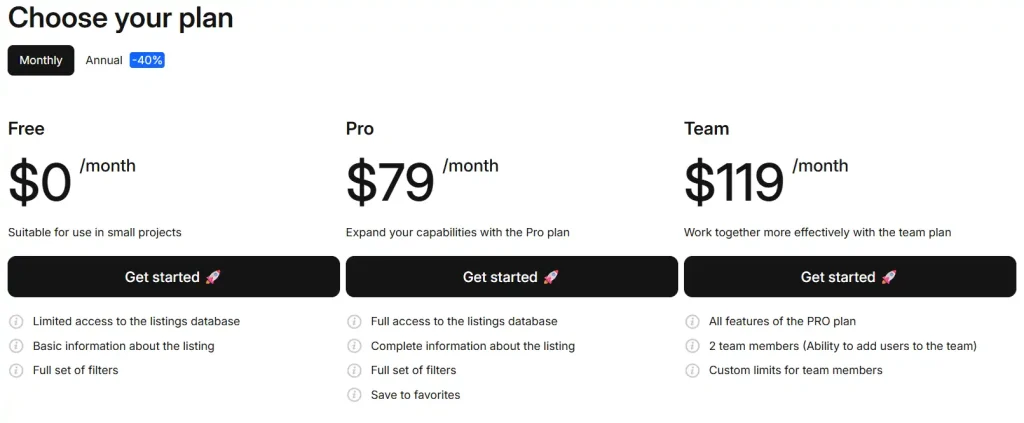
Tyver keeps pricing simple with three plans. No hidden fees. No confusing add-ons.
| Plan | Monthly Price | Annual Price | Ad Views Per Month | Key Features |
|---|---|---|---|---|
| Free | $0 | $0 | Limited | Limited database, basic ad info, full filter set |
| Pro | $79 | $569 (40% off) | 30,000 | Full database, complete ad info, favourites, folders |
| Team | $119 | $857 (40% off) | 60,000 | All Pro features plus 2 team members with custom limits |
Annual billing saves you 40%. A 6-month plan saves 20%. And a 9-month plan saves 30%. Those discounts apply across all plan extras too, including additional ad views and team members.
Additional ad views for Pro start at $32 per 30,000 views. For Team, additional views start at $47 per 30,000 views. Adding an extra team member costs just $5 per month.
Tyver Discount Code for Smarter Ad Research
exclusive
Boost your campaigns using Tyver ad intelligence tool. Get 20% off today with code ADSPYSOCIAL.
SAVE UP TO 20%
Tyver accepts bank cards and cryptocurrency for payments. Crypto support is a nice touch for affiliates who prefer privacy.
At $79 per month for Pro, Tyver sits well below premium competitors like AdSpy at $149 per month. And with features like the “In Link” filter and EU demographic data, it offers more value per dollar than most tools I have tested at AdSpy.Social.
How I Used Tyver for Nutra Research
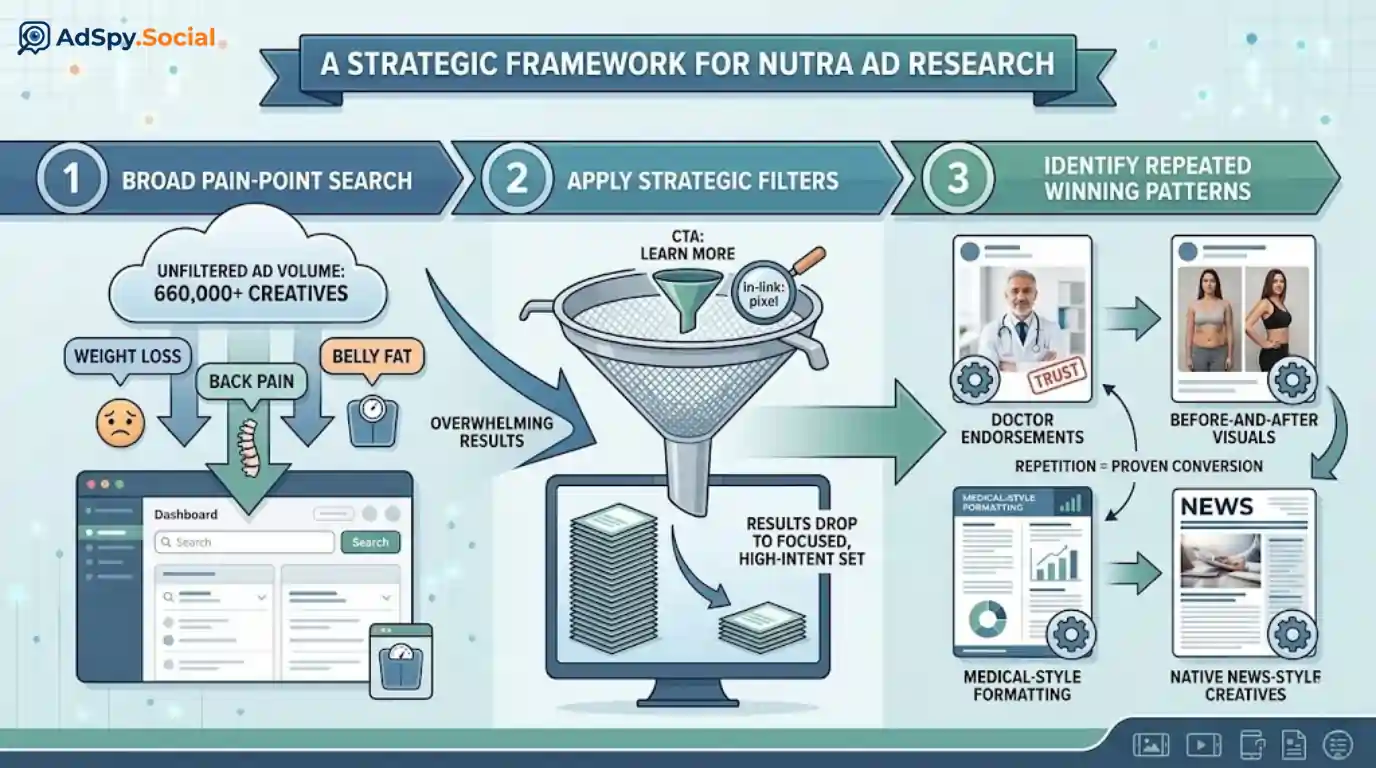
Nutra campaigns on Facebook often rely on pain-point angles. So I started my search with keywords like “weight loss” and “back pain” rather than product names. That returned over 660,000 creatives.
To narrow results, I added a CTA filter for “Learn More” and searched for ads containing “pixel” in links using Tyver's In-Link filter. Results dropped to a manageable set of focused, high-intent creatives.
I noticed clear patterns across winning nutra ads. Doctor endorsements. Before-and-after visuals. Medical-style formatting. Native news-style creatives. Each pattern repeated across multiple advertisers and geos. That repetition told me exactly which approaches to convert.
For weight loss, searches like “burn fat” and “belly fat” revealed similar consistency. Personal transformation stories. Emotional triggers. Simple explanations. When the same format shows up across dozens of advertisers, you know it works.
Tyver vs Competitors 🏅
At AdSpy.Social, we review every major ad spy tool on a regular basis. Here is how Tyver compares to popular alternatives based on our hands-on testing.
| Feature | Tyver | AdSpy | BigSpy | PowerAdSpy |
|---|---|---|---|---|
| Starting price | $79 per month | $149 per month | Free / $9 per month | $79 per month |
| Meta ad coverage | 91%+ | Large database | Multi-platform | Multi-platform |
| Daily new creatives | 1 to 2 million | Not disclosed | Not disclosed | Not disclosed |
| Countries covered | 100+ | 80+ | 100+ | 100+ |
| Advanced filters | 20+ including In-Link | Standard filters | Basic filters | Standard filters |
| Media processing | Yes | No | No | No |
| One-click translation | Yes | No | No | No |
| Team management | Yes with custom limits | No | No | Basic |
For anyone focused purely on Meta ads, Tyver is the strongest option I have tested in 2026. If you need TikTok or native ad coverage, you will need a separate tool alongside Tyver.
Tyver Review: Ratings Breakdown
Based on our extensive testing at AdSpy.Social, here is how we rate Tyver across key areas.
| Rating Category | Score |
|---|---|
| Database Size and Coverage | ⭐ 4.9 out of 5 |
| Filtering and Search | ⭐ 4.8 out of 5 |
| Campaign Analysis | ⭐ 4.9 out of 5 |
| User Interface | ⭐ 4.5 out of 5 |
| Pricing and Value | ⭐ 4.8 out of 5 |
| Overall Rating | ⭐ 4.8 out of 5 |
Conclusion
At AdSpy.Social, we have tested and reviewed over 25 ad spy tools in 2026, and Tyver earns a strong 4.8 out of 5 rating from our team.
For Meta ad spying at $79 per month, it delivers more depth and fresher data than most competitors charging double.
We gave it a solid run across gambling, nutra, and e-commerce verticals, and it performed consistently well every single time.
If you are an affiliate marketer or media buyer focused on Meta traffic, is there really a better option at this price point?